
Resume Tips 2026 matter more than ever, because the resume you send out today almost never lands directly in front of a human being first — it lands in front of a piece of software. Roughly nine out of ten recruiters now rely on an Applicant Tracking System (ATS) to scan, score, and rank resumes before a hiring manager ever opens one, and platforms like Workday, Greenhouse, and Lever have gotten considerably smarter since even a couple of years ago. Tricks that used to work — hidden white-text keyword stuffing, decorative two-column layouts, creative section headers — don’t just fail to help anymore; several of them now actively trigger rejection flags.
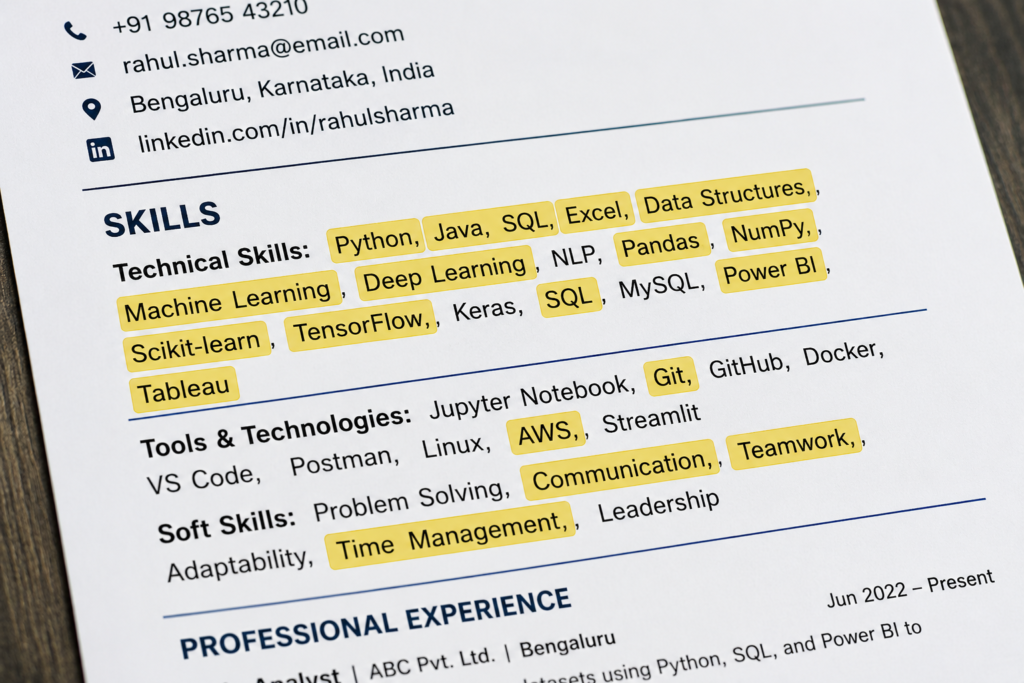
This guide walks through what genuinely works for a resume in 2026, whether you’re a fresher applying for your first job or a working professional switching roles. We’ll cover formatting choices that survive ATS parsing, how to actually use keywords without looking like you’re gaming the system, the sections every resume needs (and a few that quietly hurt you), and the small, specific mistakes that get otherwise-strong resumes filtered out before a recruiter ever sees them.
Table of Contents
Why Your Resume Needs to Pass a Robot First
Before your resume reaches a hiring manager, it typically passes through an Applicant Tracking System that scans, parses, and scores it against the job description. Modern ATS platforms don’t just do simple keyword matching anymore — they use machine learning to evaluate contextual relevance, flag suspicious keyword manipulation, and in some cases cross-reference details like your job title progression.
What this means practically: your resume has two audiences, not one. It needs to be structured cleanly enough for software to read accurately, and compelling enough for a human to want to interview you once it gets there. Optimizing for one at the expense of the other is where most resumes go wrong.
Choosing the Right Resume Format
There are three broad resume formats, and the right one depends on your career stage:
| Format | Best For | Why |
|---|---|---|
| Reverse Chronological | Freshers with internships, and most professionals | Shows clear progression; the format ATS systems and recruiters are most familiar with |
| Hybrid/Combination | Career changers, or freshers with strong skills but limited work history | Leads with skills, then supports with education/experience |
| Functional (skills-based) | Rarely recommended | Can obscure timeline; often flagged as evasive by recruiters |
For the overwhelming majority of applicants — fresh graduates and experienced professionals alike — the reverse chronological format remains the safest and most effective choice. It’s predictable, easy for both software and humans to scan, and puts your most recent and relevant experience first.
The Section Order That Actually Works
A resume structured in this sequence parses reliably across nearly every major ATS platform:
- Contact Information — name, phone, email, city, LinkedIn (if applicable)
- Professional Summary — 2-3 lines, tailored to the specific role
- Skills — a dedicated, clearly labeled section
- Work Experience / Internships — reverse chronological order
- Education
- Certifications (if applicable)
Don’t get creative with section titles. “Career Journey” instead of “Professional Experience,” or “My Strengths” instead of “Skills,” might look distinctive to a human reader, but many ATS parsers are built to recognize only standard header names — an unusual heading can mean that entire section simply doesn’t get read at all.
Formatting Rules for ATS Compatibility Resume Tips 2026
| Do | Avoid |
|---|---|
| Single-column layout | Two-column or table-based layouts |
| Standard fonts: Arial, Calibri, Times New Roman, Georgia, Helvetica | Decorative or script fonts |
| 10-12 pt font size | Font sizes under 10pt or over 14pt for body text |
| Standard section headers | Creative/unconventional header names |
| Plain bullet points | Icons, skill bars, graphics, or progress charts |
| Full month and four-digit year for dates | Abbreviated dates like “Mar 21” or “03/21” |
A resume packed with visual flourishes might look more polished when a human opens the file directly — but if it doesn’t survive the ATS parsing stage first, that polish never gets seen at all. Save the creative layout for portfolio pieces or design-specific roles where a visual resume is genuinely expected.
How to Use Keywords the Right Way
Keywords are how an ATS decides whether your resume matches a job description — but the way you use them matters as much as whether you include them at all.
- Pull keywords directly from the job posting — specific skills, tools, certifications, and terminology the employer uses. If the posting says “Power BI,” write “Power BI,” not “data visualization software.”
- Place your most important keywords in a dedicated Skills section. Skills listed here are typically weighted as self-declared competencies and often carry more scoring weight than the same term appearing once inside a work-experience bullet.
- Never hide text. Techniques like white-on-white or zero-opacity keyword stuffing were already risky a few years ago; in 2026, major ATS platforms actively detect this and can auto-reject your application with a fraud flag attached to your candidate profile — and any hiring manager who previews the file directly will see the hidden text immediately.
- Avoid keyword stuffing. Repeating the same term unnaturally across every section reads as manipulation to modern scoring algorithms, not relevance.
Writing a Professional Summary That Doesn’t Sound Generic
Your professional summary is the first thing a human recruiter actually reads with intent, so avoid generic filler like “hardworking team player seeking growth opportunities.” Instead, aim for two to three lines that state:
- Who you are professionally (your role or field)
- Your strongest, most relevant skill or achievement
- What you’re specifically targeting with this application
A tailored summary that mirrors language from the job posting performs better both with ATS scoring and with the recruiter reading it seconds later.
Quantifying Your Achievements
Vague statements are far less persuasive — to both software and humans — than specific, measurable ones. Compare:
- Weak: “Responsible for improving sales reporting.”
- Strong: “Built a sales dashboard tracking 5 KPIs, improving reporting efficiency by 20%.”
Wherever possible, attach a number to your accomplishments — percentage improvements, team size, budget managed, time saved, volume handled. If you’re a fresher without work experience to quantify, apply the same principle to academic projects, internships, or extracurricular leadership roles.
Resume Length: One Page or Two?
- Freshers and early-career candidates: aim for one page. You typically don’t have enough substantive experience to justify a second page, and a padded one-page resume performs worse than a tight one.
- Experienced professionals (5+ years): two pages is acceptable, provided every line earns its place. Don’t stretch content to fill space — cut what isn’t relevant to the specific role you’re applying for.
Handling Employment Gaps
If you have a gap longer than roughly six months, address it briefly and factually rather than leaving it unexplained or trying to disguise it with vague date ranges. A short, honest line — further education, caregiving responsibilities, a health matter, or a deliberate career break — is generally viewed far more favorably than a gap that looks concealed.
File Format: PDF vs DOCX
Both PDF and DOCX are broadly compatible with modern ATS platforms, but a few practical notes:
- DOCX is the safer default when a job posting doesn’t specify a format, since some older or less sophisticated ATS parsers handle it more reliably.
- PDF is fine for most modern platforms and preserves your formatting exactly as designed — just avoid PDFs created from scanned images or heavily designed templates with embedded graphics, which can parse poorly.
- Whichever format you choose, name the file clearly: “FirstName_LastName_Resume.pdf” rather than “Resume_Final_v3.pdf.”
Tailoring Your Resume for Each Application
Sending the identical resume to every job posting is one of the most common reasons qualified candidates get filtered out. Before each application:
- Re-read the job description and note the specific skills, tools, and qualifications mentioned
- Adjust your Skills section and professional summary to reflect the exact terminology used
- Reorder or re-emphasize bullet points under Work Experience to foreground what’s most relevant to this particular role
This doesn’t mean fabricating experience you don’t have — it means presenting your genuine experience in the language and order that best matches what this specific employer is scanning for.
Common Mistakes to Avoid
- Using a two-column or table-based layout. It might look sleek to a human eye, but many ATS parsers read the columns out of order or skip content entirely.
- Hiding keywords in white or invisible text. This is actively detected in 2026 and can result in automatic rejection with a fraud flag, not a score boost.
- Using creative section headers. “My Journey” instead of “Work Experience” risks the ATS not recognizing — and therefore not scoring — that section at all.
- Sending the same resume to every job. Generic resumes consistently underperform tailored ones, even when the underlying experience is identical.
- Leaving employment gaps unaddressed. An unexplained gap invites assumption; a brief, honest note doesn’t.
- Overloading the resume with icons, skill bars, or graphics. These frequently fail to parse and can leave entire sections unreadable to the ATS.
- Using inconsistent or abbreviated date formats. Stick to one consistent format — full month and four-digit year — throughout the entire document.
- Submitting a scanned-image PDF. If the ATS can’t extract text from your file, it can’t score you at all, regardless of how strong your actual experience is.
Expert Tips to Strengthen Your Resume
- Run your resume through a plain-text copy-paste test: copy the content into a bare text editor. If the sections, bullet points, and dates come out garbled or out of order, an ATS will likely have the same problem.
- Keep a “master resume” with your complete work history and achievements, then trim and tailor a copy for each specific application rather than editing your only version repeatedly.
- Mirror the exact phrasing of key skills and tools from the job posting — synonyms may read fine to a human but can miss exact-match keyword scoring.
- Lead each bullet point with a strong action verb (built, led, reduced, implemented) rather than a passive phrase like “was responsible for.”
- For government or public-sector job applications specifically, follow any prescribed application format exactly as instructed in the official notification — some recruitments (like several CSIR and PSU drives) have unique formatting rules that differ from standard private-sector resume conventions.
- Proofread meticulously — a single typo in a keyword (e.g., “Excle” instead of “Excel”) means the ATS won’t register that skill at all, even if you genuinely have it.
Frequently Asked Questions (FAQ)
1. What is an ATS, and why does it matter for my resume?
An Applicant Tracking System is software that companies use to scan, parse, and score resumes before a recruiter reviews them. Since a large majority of recruiters rely on ATS platforms, a resume that doesn’t parse correctly may never reach a human reader at all.
2. Should freshers use a one-page or two-page resume?
One page is strongly recommended for freshers and early-career candidates, since there typically isn’t enough substantive experience to justify more space without padding.
3. Is it okay to use a creative, visually designed resume template?
Generally no, unless you’re applying for a design-specific role where visual presentation is explicitly part of the evaluation. For most roles, a clean, single-column, ATS-friendly format performs significantly better.
4. Does hiding keywords in white text actually help my resume rank higher?
No. In 2026, this is actively detected by major ATS platforms and can result in automatic rejection with a fraud flag, rather than any scoring benefit.
5. What file format should I submit my resume in — PDF or DOCX?
Both are generally acceptable, but DOCX is the safer default when a job posting doesn’t specify a format. Avoid PDFs generated from scanned images, which often fail to parse correctly.
6. How do I handle a gap in my employment history?
Address it briefly and honestly rather than leaving it unexplained — a short, factual note about further study, caregiving, health, or a deliberate break is generally viewed more favorably than an unexplained gap.
7. Should I use the same resume for every job application?
No. Tailoring your Skills section, professional summary, and bullet point emphasis to each specific job description consistently improves both ATS scoring and recruiter response rates.
8. What’s the best resume format for someone with no work experience?
A reverse chronological or hybrid format that leads with education, internships, academic projects, and relevant skills, since this shows clear structure and is what both ATS systems and recruiters are most familiar with reading.
9. Do I need a separate Skills section, or is it enough to mention skills within my job descriptions?
A dedicated Skills section is important — many ATS platforms weight skills listed here more heavily than the same skill mentioned only once inside a bullet point.
10. How often should I update my resume?
Keep a master version updated continuously as you gain new skills, projects, or achievements, and create a tailored copy for each specific application rather than repeatedly editing your only saved resume.
Conclusion
A strong resume in 2026 isn’t about clever tricks or elaborate design — it’s about clean, predictable formatting that survives ATS parsing, honest and specific content that a recruiter can quickly evaluate, and a version tailored to each role you’re genuinely pursuing. Get the fundamentals right — single-column layout, standard section headers, a dedicated keyword-rich Skills section, quantified achievements, and consistent formatting throughout — and you remove the most common, avoidable reasons a qualified candidate never even gets seen.
For more career guidance and interview preparation resources, check out our Resume & Career Tips category page for regularly updated, practical advice. And if you’re applying to government or public-sector roles specifically, our guide on common application mistakes in government job notifications covers the formatting quirks unique to those recruitment processes.
Suggested Internal Links
- Resume & Career Tips Category
- Common HR Interview Questions and Answers
- Cover Letter Writing Tips for Freshers