A strong Software Engineer Resume Guide can be the difference between your application landing an interview and disappearing into a recruiter’s inbox — and most students and early-career developers get more of it wrong than they realize. A resume isn’t just a piece of paper with your name and a list of skills on it. It’s your entire professional summary compressed onto one or two pages, and it’s often the very first impression a company forms of you before a single human ever speaks to you.
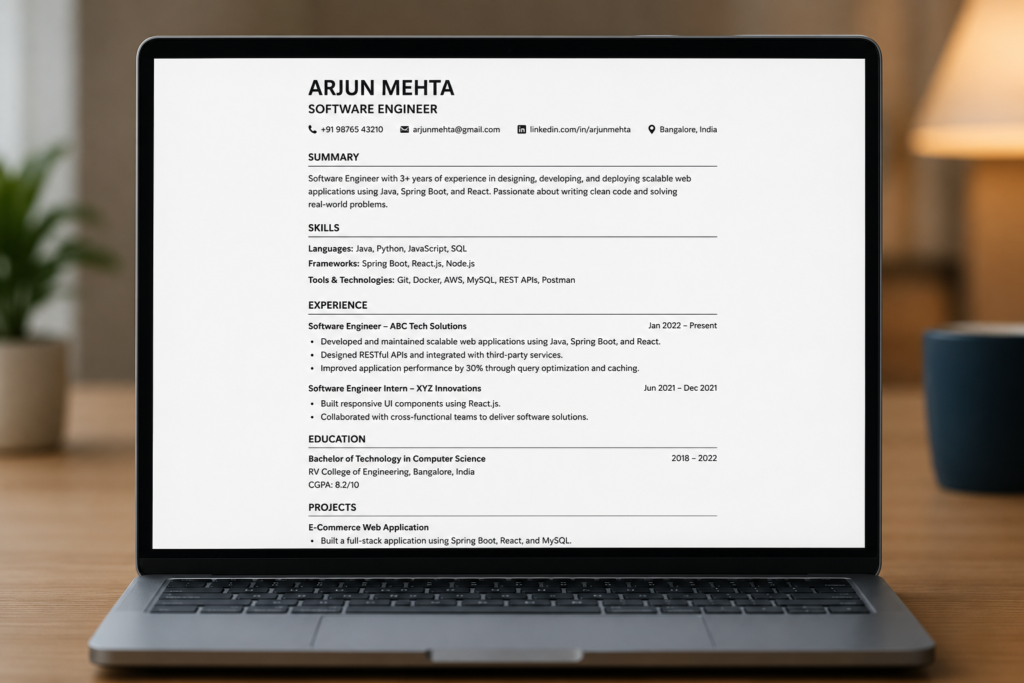
Here’s the part most guides skip: the resume itself might take you an afternoon to format, but the substance inside it — the projects, the skills, the experience — usually takes months, sometimes years, to actually build. That’s worth keeping in the back of your mind as you read this, because a resume is a reflection of the work you’ve already done, not a substitute for it.
In this guide, we’ll walk through, step by step, exactly how to structure a software engineer’s resume — from the file format you should export it in, to the order your sections should appear in, to the specific mistakes that get technically strong candidates filtered out before a recruiter even reads their project descriptions. Whether you’re a first-year student with almost nothing to show yet, or a final-year student preparing for placements and internships, this guide is built to meet you where you are.
Table of Contents
What a Resume Actually Is (And Isn’t)
Before you open a template, it helps to reframe what you’re actually building. A resume is not a formality you fill out because a job portal requires one — it’s your professional summary, condensed into a document that a company uses to judge whether you’re worth inviting to an interview.
That framing matters because it changes how you approach the content. You’re not just listing things you’ve done; you’re curating the strongest, most relevant evidence of your ability, and presenting it in a way that’s fast to scan and easy to trust. A resume with genuinely strong projects and skills, built over months of consistent effort, will always outperform a beautifully designed resume with thin, generic content behind it.
Why ATS Compatibility Matters More Than You Think
Before a human ever reads your resume, it very often passes through an Applicant Tracking System (ATS) — software that many companies use to scan, parse, and filter resumes before they reach a recruiter’s desk. If your resume’s formatting confuses this software, you can be rejected before anyone has actually read your qualifications.
This has a few direct implications for how you build your resume:
- Avoid embedded images, icons, or profile photos. Many ATS parsers cannot read information trapped inside an image, and a resume photo is not standard practice for software engineering roles in most regions.
- Stick to standard, text-based formatting. Overly creative layouts, tables used purely for decoration, or unusual text boxes can confuse parsing software and scramble your information.
- Export as a PDF, not a Word document or any other file type. A properly formatted PDF preserves your layout while remaining parsable by most modern ATS platforms.
The safest approach is to treat your resume as a clean, professional document first, and a visually appealing one second — not the other way around.
Choosing Your Resume Format
There are two broad formatting approaches most candidates choose between when following a solid Software Engineer Resume Guide:
| Format Type | Description | Best For |
|---|---|---|
| Single-Column (Horizontal) | Information flows in straight horizontal lines across the full page width | Candidates who want a clean, traditional, highly ATS-safe layout |
| Two-Column | Information is split into two vertical columns, often with skills/contact on one side and experience on the other | Candidates who want to fit more information into a compact space |
Neither format is objectively “better” — this genuinely comes down to personal preference and how much content you need to fit. What matters more than which format you pick is that you execute it cleanly, keep it consistent, and don’t let the format compromise ATS readability.
File Format, Fonts, and Colors
A few small technical decisions make a noticeable difference in how professional and functional your resume ends up being:
- File format: Always export your final resume as a PDF. Avoid submitting a
.docxor any other editable file type unless a specific application explicitly asks for it. - Font choice: Use simple, easy-to-read fonts. Avoid decorative or overly stylized fonts — clarity always wins over personality in a resume.
- Color choice: Keep your color palette minimal. Blue and black are widely considered the most professional colors for a resume, and sticking to one or two colors throughout keeps the document looking clean and consistent.
- Length: For most students and early-career engineers, one page is the target. Two pages can be acceptable once you have substantial, relevant experience, but avoid unnecessary padding just to fill space.
The Header: Getting Your Contact Info Right
Your resume should open with your full name, followed by your contact details. At minimum, include:
- A professional email address you check on a daily or regular basis, since this is how most companies will follow up with you
- A phone number where a recruiter or HR representative can actually reach you
- Optionally, a LinkedIn profile link, placed near the top of the page
Keep this section compact — it exists to make you reachable, not to take up valuable space that should go toward your actual qualifications.
The Five Core Resume Sections
Once your header is set, most strong software engineering resumes are built around five core sections:
- Skills
- Education
- Projects
- Experience
- Achievements
Beyond these five, you can optionally add sections like Hobbies, Extracurriculars/Position of Responsibility, or Certifications, depending on how relevant they are to your specific profile.
Section Order: What Should Come First
There’s no single hard-and-fast rule for section order — but there is a useful principle: whichever section makes your profile look strongest should come first.
For most students, that typically means Skills and Education near the top, since these are usually the most substantial sections early in a college career. But this isn’t universal:
- If you have multiple strong internships or freelance experience, consider moving your Experience section higher.
- If you have exceptional achievements in your field (competitive programming rankings, hackathon wins, published research), your Achievements section can move up too.
The underlying question to ask yourself is simple: if you were the recruiter, what would you want to see first? Order your resume around the honest answer to that question.
Writing Your Skills Section
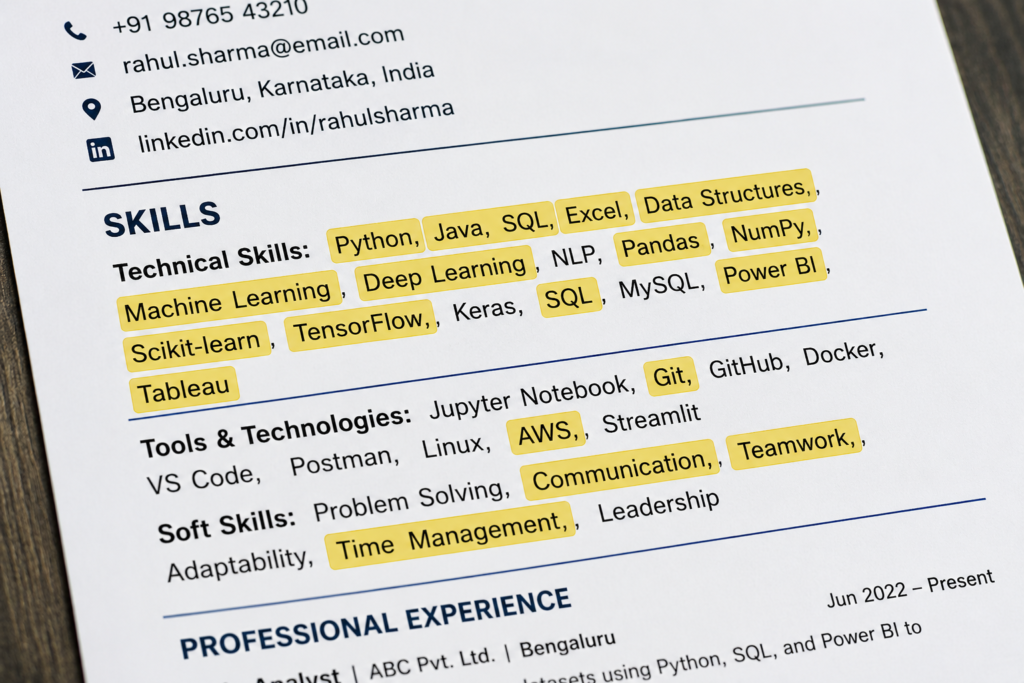
Your Skills section should primarily list the programming languages, frameworks, and tools you’re genuinely familiar with.
- List programming languages you know — C, C++, Java, Python, and others relevant to your target roles.
- If your familiarity with a language is limited to coursework, it’s fair to label it accordingly (for example, noting “basics”) rather than overstating your depth.
- Mention specific tech stacks you’ve worked with, such as app development frameworks, machine learning libraries, or web development stacks.
- Include tools and technologies like Git and GitHub, along with any professional tools commonly used in your target industry.
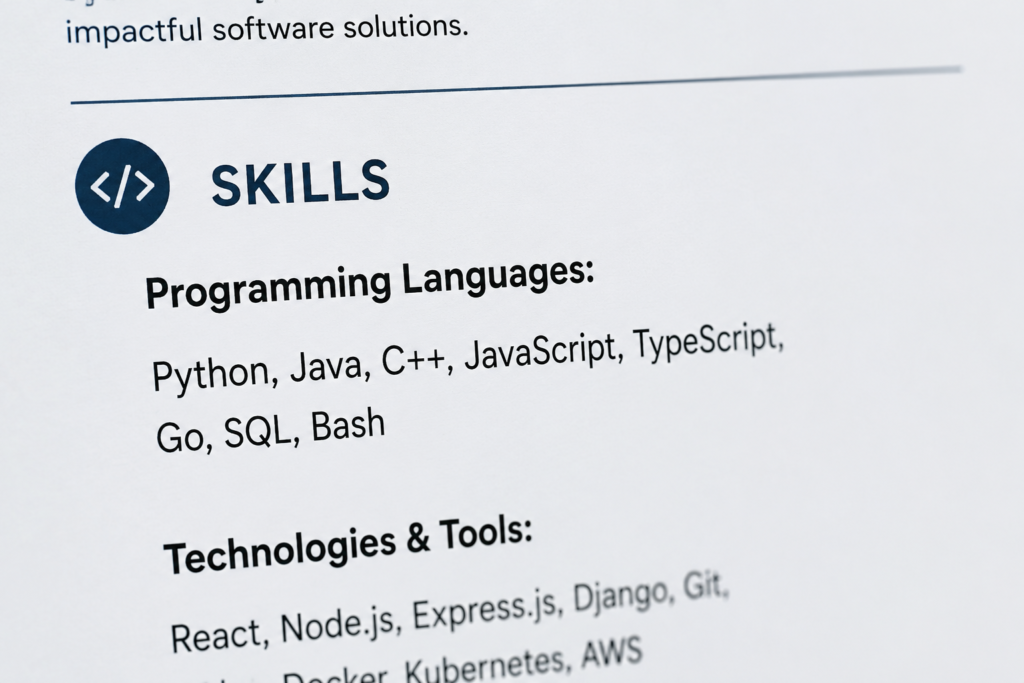
A note for first- and second-year students: If you don’t yet have much coursework or many projects to show, it’s reasonable to include relevant computer science subjects — Database Management Systems, Operating Systems, Object-Oriented Programming — in your Skills section. As you progress into your third and fourth year, shift this section toward actual technical skills, and phase out coursework listings in favor of demonstrated ability.
Writing Your Experience Section
Your Experience section is where you list internships, research work, and other substantive professional activity, including:
- Internships (technical or research-based)
- Published research articles or academic research projects
- Hackathon participation with meaningful outcomes
- Open-source contributions
- Freelancing work
- Teaching Assistant (TA) roles
For each entry, be sure to include:
- Your designation or role
- The company or organization name
- The location (if relevant)
- The exact timeline — month and year for both start and end
- A clear description of what you actually did, ideally in bullet points rather than dense paragraphs, since bullet points are easier to scan and tend to fill the page more efficiently
- A closing bullet point listing the specific tools and technologies you used during that role
If you genuinely have nothing to include in this section yet, it’s completely fine to leave it out entirely rather than padding it with unrelated content.
Writing Your Education Section
Your Education section should be listed in reverse chronological order — your most recent education first, meaning your college listed above your 12th-grade results, which in turn is listed above your 10th-grade results.
For your college entry, include:
- College name — and yes, this should be included regardless of how well-known or highly ranked your institution is. Omitting it doesn’t help your case, and completeness matters more than prestige here.
- Branch/major
- Expected year of graduation
- Your marks or GPA
On the question of weak marks: If your academic marks aren’t particularly strong, it’s reasonable to consider leaving them off your resume. That said, be aware that some companies place significant weight on academic performance and may separately request your full transcript later in the process — so be prepared for that possibility regardless of what you choose to display upfront.
If you have a strong entrance exam rank, or notable performance in olympiads or similar academic competitions, you can mention it either within your Education section or under Achievements — whichever placement tells your story more clearly.
Writing Your Projects Section
For most students, projects are one of the highest-impact sections on the entire resume — often more influential than certificates or coursework.
How many projects should you include?
| Applying For | Recommended Number of Projects |
|---|---|
| Internships (typically 3rd year) | At least 2 solid projects |
| Full-time placements | 2–3 strong projects |
More isn’t necessarily better — three well-executed, clearly explained projects will outperform six shallow ones every time.
How to structure each project entry:
- A descriptive project title. Avoid vague, stylized names that don’t communicate what the project does. Instead of a name that tells the reader nothing, use something explicit like “Database Management System-Based Healthcare Portal” or “API-Based Weather Application” — the title alone should hint at what the project is.
- A clear description of what the project does and the problem it solves.
- The technologies used to build it, listed explicitly.
- A GitHub link, so a recruiter can go directly to your code if they want to verify your work.
- A live/deployed link, if the project has been hosted and is accessible online.
Including direct links to your code and live projects is one of the simplest ways to add credibility to your resume — it shows recruiters you have nothing to hide and genuinely built what you’re claiming.
Writing Your Achievements Section
When listing achievements, prioritize domain-relevant achievements first — technical contest wins, hackathon placements, open-source recognition, competitive programming rankings, and similar accomplishments tied to your field.
If you don’t have many domain-specific achievements yet, it’s completely reasonable to include strong school-level or non-technical achievements instead. An achievement is still evidence of drive and capability, even if it isn’t directly technical.
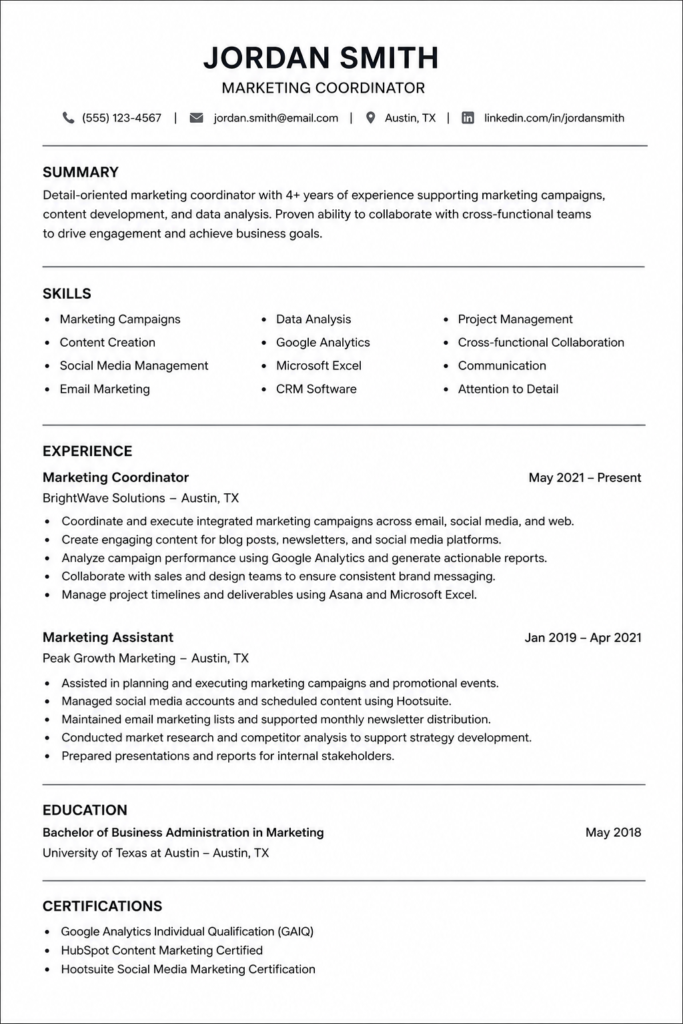
Sample Software Resume:
Optional Sections Worth Considering
Beyond the five core sections, a few optional additions can strengthen specific profiles:
- Extracurriculars / Position of Responsibility (POR): If you held a leadership or organizing role in a college society or club, this section can highlight your responsibilities and the specific timeline you held that position.
- Hobbies: Optional, and only worth including if genuine. Be cautious here — if you list a hobby like playing an instrument or a specific game, be prepared for an interviewer to ask a genuine, detailed question about it. Every line on your resume should be something you can honestly speak to.
- Certifications: In most technical fields, certifications carry less weight than your Skills and Projects sections, but if you have relevant ones worth mentioning, a small dedicated section works well.
- Open Source / Freelancing (as standalone sections): If either of these represents a significant chunk of your experience, it can be worth pulling out into its own dedicated section rather than folding it into a general Experience block.
Common Mistakes to Avoid
Even candidates who follow every step of a good Software Engineer Resume Guide can trip up on a few recurring issues. Watch out for these:
- Including a profile photo or decorative graphics. Many ATS systems can’t process embedded images, and photos aren’t standard practice for most software engineering applications.
- Using vague “buzzwords” without evidence. Words like “hardworking” or “dedicated” carry no real proof behind them. Replace them with concrete, technical accomplishments that demonstrate the same qualities implicitly.
- Submitting a
.docxor non-PDF file. This risks formatting inconsistencies across different devices and software, and can also cause ATS parsing issues. - Using vague project titles. A project name that doesn’t hint at its purpose forces the reader to work harder than necessary to understand your work.
- Overloading the resume with too many projects or too much text. More isn’t automatically better — clarity and relevance matter far more than volume.
- Leaving out your college name because it isn’t a top-tier institution. This omission tends to look worse than simply including it.
- Writing dense paragraphs instead of bullet points. Bullet points are easier for a recruiter to scan quickly, especially under time pressure.
- Skipping the proofread. Spelling and grammar mistakes are often read as a sign of carelessness, even when the underlying content is strong.
- Listing skills or hobbies you can’t genuinely speak to in an interview. Anything on your resume is fair game for interview questions — only include what you can confidently discuss.
Expert Tips to Strengthen Your Resume
These are the habits that separate a good resume from a great one, drawn from what consistently works across this Software Engineer Resume Guide:
- Read your resume as if you were the recruiter. Ask yourself honestly which section would impress you most, and make sure that section gets prime placement.
- Prioritize bullet points over paragraphs, even though it takes more effort to condense your experience into concise lines — the payoff in readability is worth it.
- Attach GitHub and live/deployed links wherever possible. This single addition can meaningfully increase your credibility with technical reviewers.
- Proofread at least twice yourself, and have at least one or two other people review it as well. A second and third set of eyes consistently catches mistakes you’ll miss on your own.
- Keep your resume evolving. A strong resume isn’t built in a single sitting — it’s refined over months as you complete new projects, internships, and coursework.
- Match your section order to your actual strengths, not a rigid template. If your experience section is your strongest asset, don’t bury it near the bottom just because a generic guide says skills should come first.
- Stay ready to defend every single line. Since interviewers frequently pull questions directly from your resume, don’t include anything — technical or otherwise — that you can’t speak to confidently and honestly.
Frequently Asked Questions (FAQ)
1. What is the ideal resume length for a software engineering student? One page is ideal for most students and early-career candidates. Two pages can be acceptable with substantial relevant experience, but avoid padding just to fill space.
2. Should I include a photo on my resume? No. Photos are not standard for software engineering resumes and can interfere with ATS parsing software used by many companies.
3. What file format should I submit my resume in? Always export and submit your resume as a PDF rather than a Word document or any other editable file type.
4. How many projects should I include on my resume? Aim for at least two solid projects if applying for internships, and two to three strong projects if applying for full-time placements. Quality matters more than quantity.
5. Should I mention my college name if it isn’t a well-known institution? Yes. Regardless of your college’s ranking or reputation, you should always include its name on your resume.
6. What if my academic marks aren’t very strong? You can choose to leave marks off your resume if you’re not comfortable including them, but be prepared for some companies to separately request your full academic transcript later in the process.
7. Which section should come first on my resume? There’s no fixed rule — place whichever section best represents your strongest qualifications first. For most students, this is typically Skills and Education, but strong experience or achievements can justify a different order.
8. Are certifications important for a software engineering resume? Generally, certifications carry less weight than your Skills and Projects sections in the tech industry, though they can still be worth including in a dedicated section if relevant.
9. Should I include hobbies on my resume? Only if you’re comfortable being asked detailed, genuine questions about them in an interview. Every line on your resume should be something you can honestly discuss.
10. What colors and fonts should I use on my resume? Stick to simple, easy-to-read fonts and a minimal color palette — blue and black are widely regarded as the most professional color choices for a resume.
Conclusion
A great Software Engineer Resume Guide ultimately comes down to one core idea: your resume should be an honest, clearly organized reflection of real work — not a decorated container for vague claims. Get the fundamentals right — a clean, ATS-friendly PDF, sensible section order, descriptive project titles, and bullet points over paragraphs — and let your actual skills, projects, and experience do the heavy lifting.
None of this happens overnight. The formatting can be fixed in an afternoon, but the substance behind a genuinely strong resume is built over months of consistent projects, internships, and learning. Start building that substance today, and revisit your resume regularly as your profile grows.
For more guides on building your technical profile, preparing for interviews, and navigating your early career, check out our [Career Resources category page] for regularly updated, practical advice.
Suggested Internal Links For More Hirings
Suggested External References (for fact-checking and updates)
| S.No | Document | Action |
|---|---|---|
| 1 | Official LinkedIn Resume & Career Resources | Visit |
| 2 | LinkedIn Learning – Resume Writing Courses | View |
| 3 | MIT Career Advising & Professional Development | Visit |
| 4 | IIT Bombay Placement Office | Visit |
| 5 | IIT Delhi Office of Career Services | Visit |
| 6 | Jobscan ATS Resume Checker | Check |
| 7 | Resume Worded ATS Score Checker | Check |