How to build an ATS-friendly resume is one of the most important questions you can ask before you start applying for jobs. It’s the single biggest factor standing between you and your next interview call.
If you’ve ever wondered why a highly qualified candidate gets rejected within seconds of applying, the answer usually lies in how their resume is structured, not in what they actually know.
Recruiters today receive hundreds, sometimes thousands, of applications for a single job opening. Most of those resumes never even reach a human being — they’re filtered by software first.
In this guide, we’ll walk through exactly how to build a resume that clears both the software filter and the human recruiter’s quick scan. We’ll go section by section, with real, practical examples you can apply today whether you’re a fresher or an experienced professional.
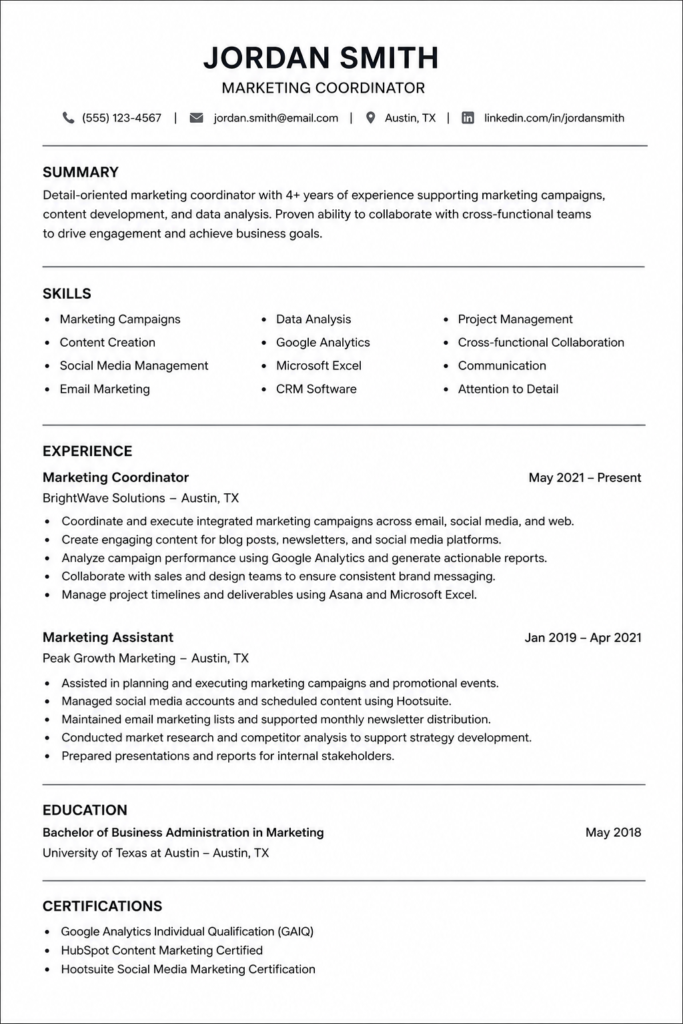
Table of Contents
Why Your Resume Gets Rejected in Seconds
Imagine a company opens a position for a Java Developer. Within two to three days, that single job posting can receive 500, 1,000, or even 1,500 applications. For larger companies, this number can cross 5,000. Now think about it realistically: does a recruiter have the time to open every single resume and read it line by line? They simply don’t.
On average, a recruiter spends only six to seven seconds scanning a resume before deciding whether to move it forward or discard it. In that brief window, your entire academic effort, your projects, and your certifications are judged purely on presentation. No matter how skilled you are, if your resume isn’t structured well, it may not even survive the first round.
This is exactly why resume building deserves as much attention as skill building. Your resume is your first impression — before you ever get the chance to speak in an interview, your resume speaks for you.
What Is an ATS and Why It Matters
Before your resume ever reaches a recruiter’s inbox, it usually passes through an Applicant Tracking System (ATS) — software that automatically scans resumes to check whether your experience, skills, and projects match the job description. Only after clearing this automated screening does your resume land in front of an actual recruiter.
This means your resume needs to satisfy two separate audiences:
| Audience | What They Look For |
|---|---|
| ATS Software | Relevant keywords, clean formatting, readable text |
| Human Recruiter | Clarity, professionalism, impact, and relevance |
Both are equally important. A resume that’s keyword-rich but visually cluttered may pass the ATS but fail with the recruiter — and vice versa. Your goal is a resume that satisfies both simultaneously.
Choosing the Right Resume-Building Platform
There are many resume builders available online, but a text-based, code-driven tool like Overleaf (which uses LaTeX) tends to produce cleaner, more professional, and more ATS-compatible resumes compared to drag-and-drop Word templates full of graphics and columns.
Here’s a simple way to get started:
- Search for a trusted resume template (many creators share free ATS-friendly LaTeX templates).
- Copy the template code.
- Open an online LaTeX editor and create a new blank project.
- Paste the copied code and replace the placeholder details with your own information.
- Recompile to instantly preview your formatted resume.
Don’t be intimidated by the idea of “code” — you’re not writing any programming logic. You’re simply replacing sample text (like a name or job title) with your own details inside a ready-made template. Most editors also let you double-click any element in the preview to jump straight to that part of the code, making edits even easier.
Header Section: First Impressions Matter
The very first thing a recruiter notices is your header — and contrary to popular belief, it’s not really about your name or hometown. It’s about your professionalism.
What your header should include:
- Full name — first name followed by surname, professionally formatted
- Target role/title — mention the specific role you’re applying for; this signals to the recruiter that you’re not mass-applying blindly
- Phone number — correct and reachable
- Professional email address — ideally in the format
firstname.lastname@gmail.com - LinkedIn profile link — cleaned up to show just your username, not a long auto-generated URL
- GitHub profile link (especially for technical roles) — this acts as proof of the skills and projects you claim to have
- Portfolio link (if you have one, or consider building one) — deployed live, not just a local file
What to avoid in your email ID: Avoid casual or humorous email addresses. Something like “rockstar123@gmail.com” or “kingkiller99@gmail.com” instantly signals a lack of professionalism, no matter how strong your skills are.
Information you should never include:
- Father’s/mother’s name
- Marital status
- Gender
- Religion
- Aadhaar or other government ID numbers
- Full home address
Unless you’re applying for a government position where such details are explicitly required, none of this belongs on a professional resume. Recruiters care about your skills and experience — nothing more.
Should You Include a Summary Section?
There’s a common misconception that every resume must have a summary section. In reality, it’s optional — especially for freshers.
If you can write a strong, specific two-to-three-line summary that reflects your actual strengths, go ahead and include it. But avoid generic, overused phrases like:
- “Hardworking”
- “Passionate”
- “Quick learner”
- “Self-motivated”
Recruiters read thousands of resumes, and these phrases have become background noise — they add no real value and can even come across as filler. If you don’t have something specific and genuine to say, it’s better to skip this section entirely rather than fill it with clichés.
For experienced professionals, a well-written summary can be more useful, since it helps quickly convey your career trajectory and specialization.
Education Section: What to Include and What to Skip
Keep your education section minimal and relevant:
- Mention only your most recent qualification (e.g., your degree)
- Include college/university name, branch, and year
- Include your GPA/CGPA only if it’s strong — a low score can hurt your impression more than help it
- Skip 10th and 12th-grade details unless a specific company explicitly requests them
The goal here is brevity. Recruiters don’t need your entire academic history — just enough to confirm your qualification.
Single Page vs. Multiple Pages: What’s Best?
For freshers, a single-page resume is strongly recommended. Since a recruiter spends only six to seven seconds scanning your resume, a single page allows them to take in your entire profile in one glance, from top to bottom.
Generally, a fresher simply doesn’t have enough professional content to justify multiple pages. Cramming in unnecessary details just to fill space works against you — it dilutes the impact of your most important information.
Experienced professionals with several years of relevant work history may extend to two pages if genuinely necessary, but conciseness should still be the priority.
Skills Section: The Most Scanned Part of Your Resume
The skills section is arguably the most heavily scanned part of your entire resume — both by the ATS and by the recruiter. This is where most of your keyword matching happens, so it deserves careful thought.
Avoid vague, generic labels like:
- Programming
- Coding
- Internet
- Computer Knowledge
- MS Office
These terms are too broad to mean anything to an ATS or a recruiter.
Instead, structure your skills clearly by category:
| Category | Example |
|---|---|
| Programming Languages | Java, Python, C++ |
| Frameworks | Spring Boot, React, Django |
| Databases | MySQL, MongoDB, PostgreSQL |
| Tools | Git, Docker, Postman |
| Cloud Platforms | AWS, Azure |
This kind of detailed, categorized structure helps the ATS extract clean keyword matches and gives the recruiter an instant, accurate picture of your technical range.
Important rule: Only list skills you can confidently discuss in an interview. If you mention Docker on your resume, expect to be asked about it — and you need to be able to answer. Listing things you don’t actually know will backfire quickly once the interview starts.
Tailoring Your Resume for Every Job Application
One of the most common — and most damaging — mistakes candidates make is using the exact same resume for every single job application.
Since most companies screen resumes through an ATS first, your resume needs to contain keywords that match the specific job description. For example, if you’re applying for a Java Developer role, your resume should reflect relevant keywords such as JDBC, SQL, Spring Boot, or Spring Framework — because these are likely the terms the ATS is scanning for.
A simple three-step process to tailor your resume:
- Copy the job description from the listing.
- Identify the key skills and terms it emphasizes.
- Adjust your resume to genuinely reflect those skills (only if you actually possess them).
Doing this consistently can significantly increase your chances of clearing the first automated screening round.
Projects Section: How to Actually Impress a Recruiter
If there’s one section that can make or break your resume within seconds, it’s the projects section. This is where recruiters look for real, tangible proof of your abilities — not just claims.
Structure each project entry like this:
- Project title — clear and descriptive
- Tech stack used — languages, frameworks, tools
- 3–4 bullet points describing what you built, what problem it solved, and what impact it created
- A live deployment link, if possible (many platforms offer free hosting/deployment)
- Future scope — briefly mention how you plan to improve or scale the project further
Avoid vague descriptions like:
- “Backend work done”
- “API work done”
- “Java work done”
These tell the recruiter nothing. Instead, focus on answering three questions in your bullet points:
- What exactly did you build?
- What problem did it solve?
- What measurable impact did it create?
Use strong action verbs, such as:
- Developed
- Deployed
- Implemented
- Optimized
- Integrated
- Automated
- Improved
- Reduced
- Built
Quantify wherever possible. Recruiters trust numbers more than adjectives. For example:
“Optimized SQL queries, reducing API response time by 30%.”
This kind of measurable statement is far more convincing than simply saying you “improved performance.”
Recommended project count: Stick to 2–3 well-explained projects. Listing ten projects doesn’t impress anyone — in fact, it dilutes attention. A recruiter will not read through ten entries; two or three strong, detailed projects will always outperform a long, shallow list.
If your projects and their descriptions are strong enough, you generally don’t need a separate “Experience” section for freshers — your project depth already conveys your practical exposure.
Certifications and Achievements: Quality Over Quantity
For certifications:
- Only include certifications relevant to the role you’re applying for. A digital marketing or photography certificate adds no value to a Java Developer application.
- Prioritize certifications from trusted, recognized platforms over free, low-value certificate mills — recruiters do notice the difference.
For achievements/awards (optional but valuable if genuine):
- Hackathon participation or wins
- Coding contest rankings
- Research paper contributions
Keep this section selective. Only include what genuinely adds professional value — avoid listing every minor certificate or activity just to fill space.
Formatting Rules: Do’s and Don’ts
Don’ts
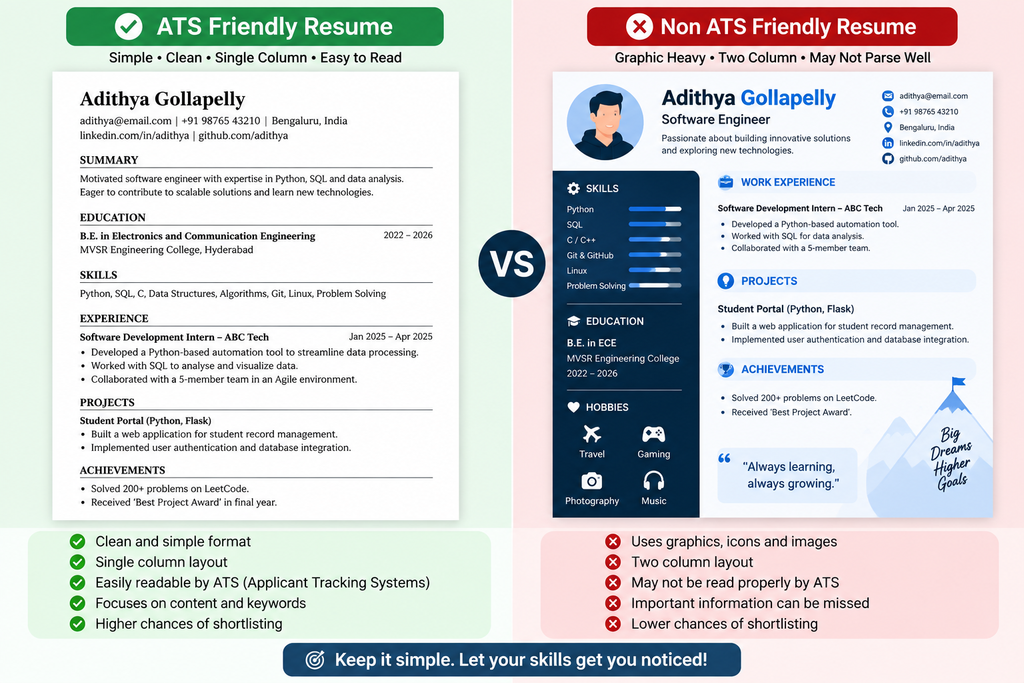
- No tables
- No multiple columns
- No images or profile pictures
- No fancy graphics or heavy icons
- No rainbow colors or excessive design elements
Do’s
- Use ATS-recognized fonts like Times New Roman or Arial
- Font size: 16–20 for your name, 10–12 for body content
- Stick to a white background with black text
- Keep the layout simple, clean, and easy to scan
Fancy design elements might look visually appealing to the human eye, but ATS software often struggles to parse tables, columns, and graphics correctly — which can cause your information to be misread or missed entirely.
File Naming: A Small Detail That Costs Big Opportunities
This might sound trivial, but it genuinely matters. How you name your resume file reflects your attention to detail and professionalism.
Avoid file names like:
resume.pdffinal_resume.pdfresume_experience_final2.pdf
Instead, use a clean, professional format:
FirstName_LastName.pdf(e.g.,John_Smith.pdf)
It’s a small detail, but some recruiters do notice it — and it’s an easy way to reinforce the professional impression you’ve built throughout the rest of your resume.
How to Correctly Check Your ATS Score
Many candidates check their ATS score incorrectly — by simply uploading their resume alone to a checker tool and expecting an accurate score. This approach is flawed.
Why? An ATS score is calculated by comparing your resume against a specific job description’s keywords. Without the job description, a scoring tool has no reference point to judge relevance.
The correct way to check your ATS score:
- Upload your resume AND the job description together (many trusted tools support this).
- Let the tool compare both and generate a genuine, contextual score.
- Use the feedback to refine your keyword usage accordingly.
Simply uploading a resume without a job description will only give you a generic — and often misleading — score.
Common Mistakes to Avoid
| Mistake | Why It Hurts You |
|---|---|
| Using the same resume for every job | Fails to match job-specific ATS keywords |
| Including unnecessary personal details | Wastes space, appears unprofessional |
| Generic summary phrases (“hardworking,” “quick learner”) | Adds no real value, feels repetitive to recruiters |
| Too many projects listed | Dilutes focus; recruiters won’t read through all of them |
| Vague project descriptions (“backend work done”) | Fails to show real impact or skills |
| Fancy templates with tables/graphics | ATS may fail to parse the content correctly |
| Careless file naming | Signals lack of professionalism |
| Listing skills you can’t explain | Backfires during technical interviews |
| Irrelevant certifications | Adds no value to the specific role |
| Missing GitHub/portfolio links (for technical roles) | No proof of practical skills |
Expert Tips for a Standout Resume
- Match the job description directly. Extract key terms from the posting and reflect them naturally in your resume.
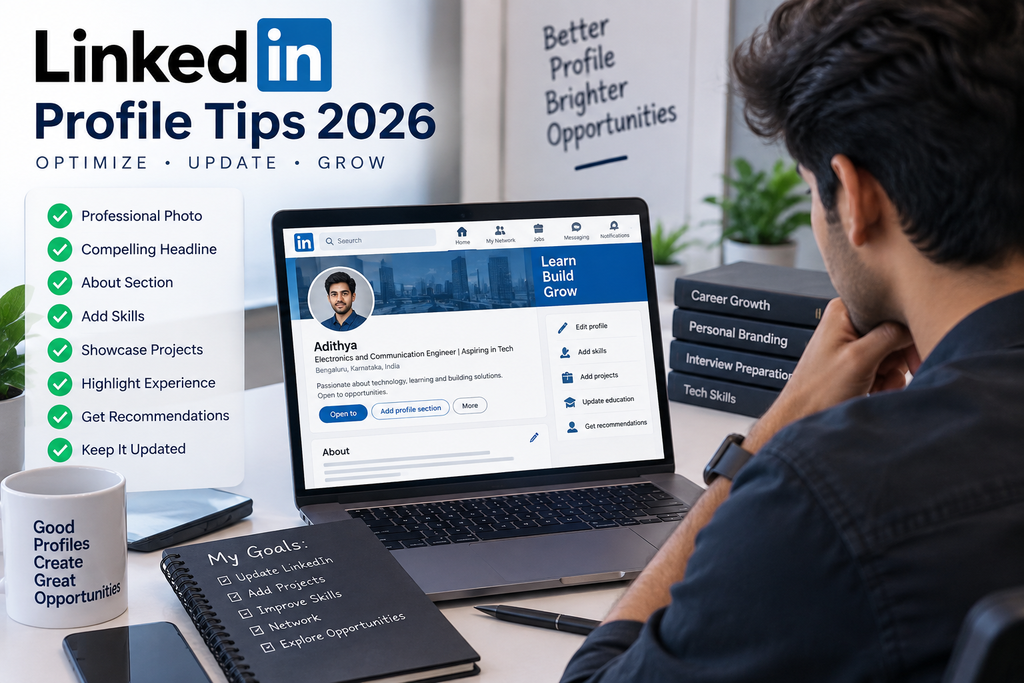
- Keep your LinkedIn and GitHub profiles updated. Recruiters often check these right after your resume — make sure they reflect your latest skills and projects.
- Be genuinely honest. Confidence and authenticity in an interview matter as much as technical skill. A recruiter is more likely to give a chance to someone with slightly fewer skills but strong communication and attitude than someone who oversells and can’t back it up.
- Always deploy your projects, even personal ones. A live link adds far more credibility than just mentioning a project name.
- Numbers speak louder than adjectives. Wherever you can quantify impact — do it.
- Keep refining. Your resume isn’t a one-time task; update it as you gain new skills, certifications, or project experience.
Frequently Asked Questions (FAQ)
1. What does ATS-friendly mean for a resume?
An ATS-friendly resume is formatted in a way that Applicant Tracking System software can easily read and parse — using clean text, standard fonts, and relevant keywords, without tables, columns, or graphics that could confuse the scanning software.
2. Do freshers need a summary section on their resume?
No, it’s optional. If you can write a specific, genuine summary, it can help. Otherwise, generic filler phrases can do more harm than good, so it’s better to skip it.
3. Should I use a single-page or multi-page resume as a fresher?
A single-page resume is generally recommended for freshers, since it fits neatly into a recruiter’s quick scanning window and keeps your profile focused.
4. How many projects should I include on my resume?
Two to three well-explained, high-quality projects are ideal. Listing more than that tends to dilute attention rather than add value.
5. Is a GitHub profile necessary for technical roles?
Yes, especially for software-related roles. It serves as proof of the skills and projects you mention, which recruiters often check to validate your claims.
6. How do I correctly check my resume’s ATS score?
Upload both your resume and the specific job description together into a trusted ATS-checking tool, so the score reflects an accurate, contextual match rather than a generic result.
7. What fonts are considered ATS-safe?
Standard, widely recognized fonts like Times New Roman and Arial are considered ATS-safe. Avoid decorative or unusual fonts.
8. Should I include my photo on my resume?
No, profile pictures are generally discouraged on ATS-friendly resumes, as they add no functional value and can sometimes interfere with parsing.
9. Is it necessary to tailor my resume for every job application?
Yes. Matching your resume’s keywords to each specific job description significantly increases your chances of passing the initial ATS screening.
10. Can a strong resume alone guarantee a job offer?
No. A strong resume gets you past the initial screening, but the interview stage still depends on your preparation, communication skills, confidence, and how well you can explain what you’ve listed on your resume.
Conclusion
A great resume isn’t about looking fancy — it’s about being clear, honest, and strategically structured so that both software and human recruiters can quickly understand your value. Focus on a clean format, relevant keywords tailored to each job description, a strong projects section with measurable impact, and a professional presentation throughout. Pair that with genuine preparation and confident communication, and you’ll significantly improve your chances of not just getting past the ATS, but genuinely impressing the recruiter on the other side.
If you found this guide useful, explore more career and job-preparation resources on our Career & Resume Tips category page for further guidance on interviews, skill-building, and job applications.
Suggested Internal Links
Suggested External References (for fact-checking/verification)
| S.No | Resource | Action |
|---|---|---|
| 1 | LinkedIn Help Center – Profile Best Practices | Visit |
| 2 | Overleaf – LaTeX Resume Templates & Documentation | View |
| 3 | Jobscan Help Center | Visit |
| 4 | Resume Worded – ATS Resume Resources | Explore |
| 5 | Coursera Certificate Verification | Verify |
| 6 | Google Cloud Skills Boost Credentials | Verify |