Free ATS Resume Builder Tools 2026, search “free ATS resume builder” and you’ll land on dozens of tools all claiming the same thing — free, ATS-friendly, ready in minutes. Some of that is true. A meaningful chunk of it isn’t, and the gap usually shows up exactly when you’re ready to download: a watermark stamped across your PDF, a “free” export that suddenly wants a card number, or a beautifully designed template that an actual ATS parser reads as gibberish because of the columns and icons.
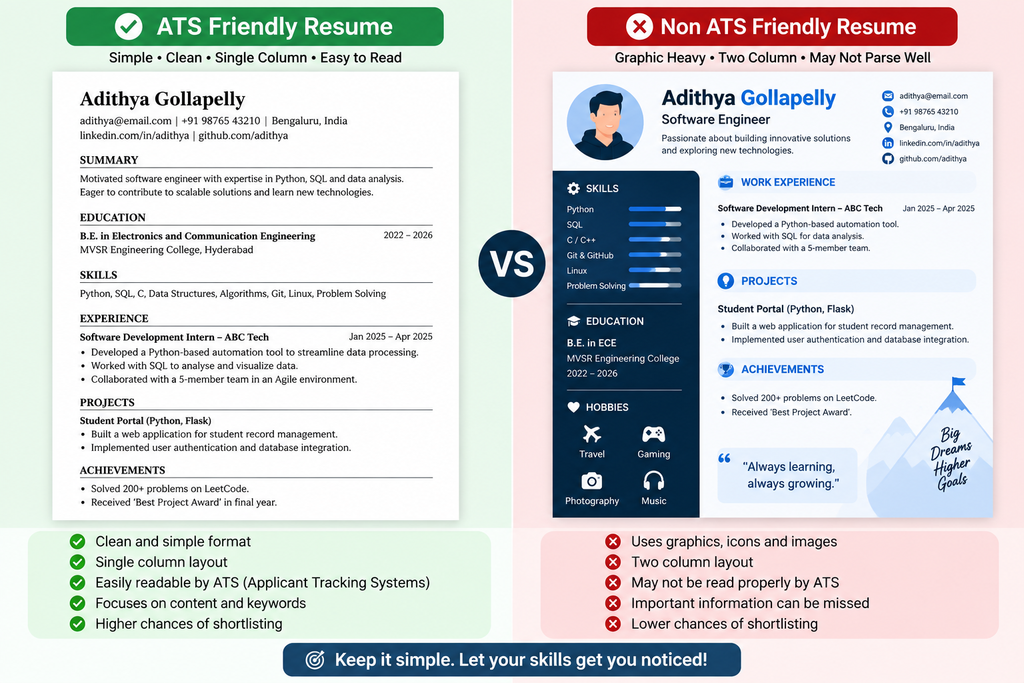
This guide is built specifically around your Resume Tips category, as a companion to the writing-focused resume advice already on the site — this one is about the tools themselves: which ones genuinely let you build and download a working resume for nothing, which ones quietly aren’t free at all, and why a resume that looks great to your eyes can still fail an ATS scan without you ever knowing.
Table of Contents
Why This Even Matters: The ATS Problem in One Paragraph
An Applicant Tracking System is software that scans and scores your resume before a human recruiter ever opens it — used by the large majority of mid-size and large employers today. Free ATS Resume Builder Tools 2026 research from Harvard Business School and Accenture on what’s been called “hidden workers” found that a substantial share of otherwise qualified candidates get screened out automatically, and separately, a large share of employers themselves acknowledge their own ATS software sometimes rejects candidates who could actually do the job. The reasons are almost always mechanical, not personal: two-column layouts the parser reads out of order, missing standard section headings, graphics and icons the software can’t interpret, or a file format the system can’t open cleanly. A free tool that produces a good-looking resume the parser can’t read is, for job-application purposes, not actually free — it cost you the application.
The Category Trap: “Free” Design Tools vs. “Free” ATS Tools
This is the single most important distinction to understand before picking a tool, and it’s where most people go wrong.
General design tools (Canva is the obvious example) are genuinely free to use and export from, with a huge template library. The problem is structural: most visually striking resume templates use multi-column layouts, icon-based skill ratings, and graphic elements that a general design tool doesn’t design around ATS parsing at all — because that’s not what the tool was built for. You can build a stunning resume in Canva and have it read as broken or incomplete by the software actually deciding whether a human ever sees it.
Purpose-built ATS resume tools are designed the opposite way: plain, single-column layouts, standard section headers, and export formats specifically tested against real ATS software. They look less flashy. They’re also far more likely to actually reach a recruiter.
If you’re applying to roles through a company careers portal or a job board rather than handing your resume directly to someone, prioritize the second category every time, even if the first produces a prettier PDF.
Free Tools Worth Knowing, Compared Honestly
| Tool | Genuinely Free? | Best For | The Catch |
|---|---|---|---|
| Google Docs | Yes, fully | Simple, guaranteed-safe formatting | No AI assistance, no ATS-specific templates built in — you control formatting yourself |
| FlowCV | Yes, for one resume | A single, clean ATS-friendly resume | Additional resume versions or advanced features often sit behind a paid tier |
| Canva | Yes, unlimited PDF exports | Visual/creative roles, portfolios | Most templates are not ATS-safe due to columns and graphics |
| Rezi | Free tier available | Candidates who want an ATS score/simulation | Full AI-writing features typically require upgrading |
| Kickresume | Free tier available | AI-assisted content writing | Some templates and advanced AI features are paywalled |
| Teal | Free tier available | Managing multiple job applications and resume versions | Advanced tracking/analytics features are paid |
| Indeed’s Resume Builder | Yes | Fast, no-frills builds tied to Indeed applications | Limited customization compared to dedicated builders |
A pattern worth noticing across nearly every “free” resume tool on the market right now: the resume-building experience itself is usually free, but something downstream — extra templates, unlimited downloads, watermark removal, or AI content generation beyond a small quota — is where the paywall actually sits. That’s a legitimate business model, not a scam, but it means “free resume builder” rarely means “everything about this tool, forever, free.”
A Genuinely Free Path That’s Easy to Overlook
If your priority is simply getting a clean, ATS-safe resume out the door with zero risk of a paywall surprise, Google Docs with a plain, single-column template remains one of the most reliable free options that exists — because there’s no company gating any feature behind a subscription, and you have complete control over formatting simplicity. The trade-off is that you don’t get AI-assisted writing suggestions or an automated ATS score the way a dedicated resume tool provides — you’re doing the formatting discipline yourself, following the ATS-safe principles below.
Building an ATS-Safe Resume Yourself: The Formatting Rules That Matter Most
Whichever tool you choose, these structural rules apply universally, and following them matters more than which specific software you pick:
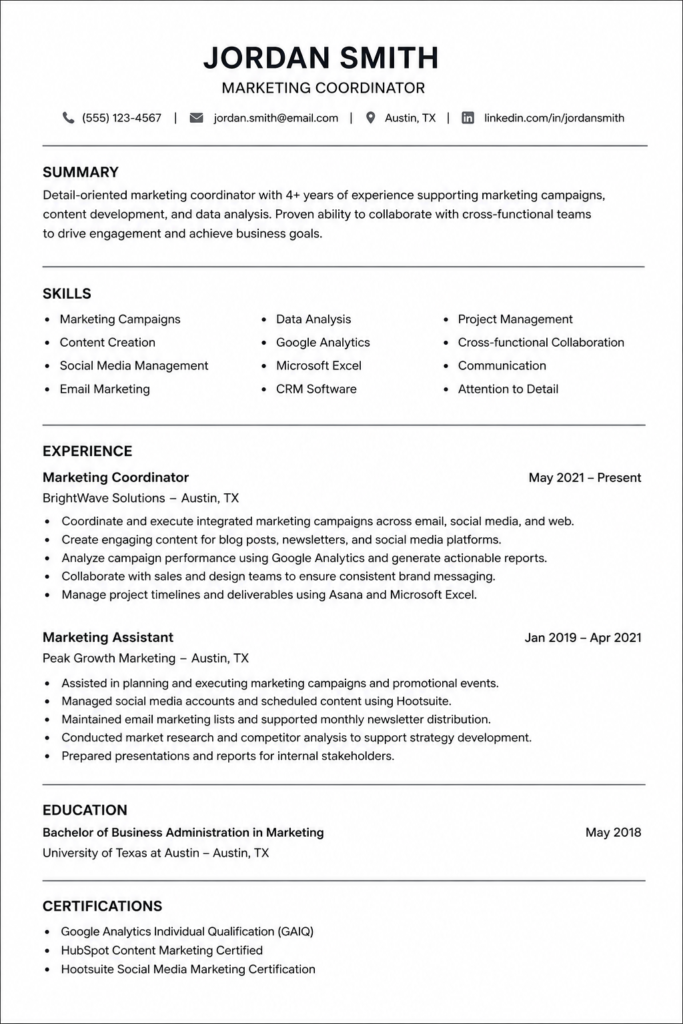
- Single-column layout only. Two-column designs are the single most common reason a good resume parses incorrectly.
- Standard section headings. “Work Experience,” “Education,” “Skills” — not creative alternatives like “My Journey” or “What I Bring.”
- No graphics, icons, or skill-rating bars. These either get ignored entirely or, worse, get misread as garbled text by parsing software.
- Simple, widely supported fonts. Arial, Calibri, Times New Roman, or Georgia — nothing decorative or script-based.
- Consistent date formatting. Full month and four-digit year throughout, not a mix of formats across different sections.
- PDF export, unless a specific application says otherwise. Most modern ATS platforms handle PDF cleanly; only switch to DOCX if a job posting explicitly requests it.
Step-by-Step: Building Your Resume for Free
- Choose your tool based on your actual need — Google Docs or FlowCV for a straightforward, ATS-safe single resume; Rezi or Teal if you want built-in ATS scoring and are managing multiple applications; Canva only if you’re applying somewhere design itself is being evaluated (portfolio-based creative roles).
- Start from a genuinely simple template, not the most visually elaborate one on offer — resist the pull toward a template that “looks impressive,” since impressive-looking and ATS-safe are frequently in tension.
- Fill in your content section by section, following the standard order: Contact Information, Professional Summary, Skills, Work Experience (or Projects/Education for freshers), Certifications.
- Use a free ATS checker or simulator if your tool offers one, to catch formatting issues before you submit anywhere — but treat any single tool’s “match score” as a directional signal, not a certainty, since different companies’ ATS software behaves differently.
- Export as PDF and do a plain-text test: copy your exported resume’s content into a bare text editor. If sections, bullet points, and dates come out garbled or reordered, an ATS is likely to have the same problem — go back and simplify further.
- Save your master version, then create a lightly tailored copy for each specific job application rather than editing your only saved file repeatedly.
What to Avoid Entirely
- Any tool that lets you build for free but charges specifically to download. As several independent resume-tool reviews have pointed out, that’s not a free resume builder — that’s a lead-generation funnel disguised as one.
- Templates with embedded tables used for layout. Even when they look like simple columns, tables frequently confuse ATS parsers in ways that aren’t visible until the resume is actually scanned.
- Any free tool requiring payment information upfront “just in case.” A tool that’s genuinely free for the feature you’re using shouldn’t need a card on file for that specific feature.
- Relying on a resume “score” from only one tool as your final word. Cross-check with at least one other checker or a knowledgeable human reader before trusting a single number completely.
Frequently Asked Questions
Is Canva good for an ATS-friendly resume?
Canva is genuinely free with unlimited PDF exports, but most of its templates use multi-column layouts and graphics that aren’t ATS-safe — better suited to design-focused roles than to applications going through a company’s ATS.
What’s the most reliably free resume-building option?
Google Docs with a plain, single-column template, since there’s no paywall on any part of the formatting process — you simply need to apply ATS-safe formatting rules yourself.
Do free ATS checkers actually work?
They give a useful directional signal about formatting issues, but no single free checker can guarantee compatibility with every company’s specific ATS software, since different platforms parse resumes differently.
Why do some “free” resume builders charge to download the PDF?
This is a common business model where the building experience is free but the final export is gated — worth checking before you invest time building a resume you’ll then need to pay to actually use.
Should I use a two-column resume template if I like how it looks?
Not if you’re applying through an ATS-driven company portal — two-column layouts are one of the most common reasons an otherwise strong resume gets misread or scored poorly.
What file format should I use — PDF or Word?
PDF is generally safe for most modern ATS platforms; only switch to a Word document if a specific job posting explicitly asks for that format.
Can I build multiple resume versions for free?
This varies by tool — Google Docs allows unlimited free versions since there’s no per-resume charge, while some dedicated builders limit free accounts to a single saved resume.
Is AI-written resume content from a free tool good enough to use directly?
Treat AI-generated resume content as a strong starting draft, not a finished product — review it for accuracy and make sure every claim reflects your actual experience before submitting it anywhere.
The Bottom Line
The honest answer to “which free ATS resume builder is best” depends entirely on what you’re optimizing for. If you want zero risk of a paywall surprise and are comfortable applying formatting discipline yourself, Google Docs remains genuinely hard to beat. If you want built-in ATS scoring and don’t mind a free tier’s limits, tools like Rezi, Teal, or FlowCV are reasonable starting points — just read what’s actually included in the free tier before you build your whole resume there. What matters far more than which specific tool you pick is following the same core formatting discipline across all of them: single column, standard headings, no graphics, and a genuine plain-text test before you submit anywhere.
For more resume guidance across every career stage, check out our Resume Tips category page. And if you haven’t yet, our guide on Resume Tips 2026 covers the writing and content side — what to actually say in each section — as the natural next step once your formatting is sorted.
Suggested Internal Links
- Resume Tips Category
- Resume Tips 2026: Land Your Dream Job Faster
- Resume Tips for Freshers 2026: Best First Job Guide
- Resume Tips for Experienced Candidates 2026: Best Guide
Suggested External References
- Google Docs: https://docs.google.com
- FlowCV: https://flowcv.com