
Resume Tips for Government Jobs 2026 need a genuinely different playbook than the corporate resume advice you’ll find everywhere else online — because government recruitment doesn’t run through an Applicant Tracking System scanning for keywords. It runs through a human clerk or a selection committee cross-checking your biodata line-by-line against a prescribed format, your SSC memo, and a checklist of self-attested photocopies. Apply the wrong lessons here — a creative two-column layout, a punchy “professional summary,” keyword-optimized bullet points — and you can actually hurt your application rather than help it.
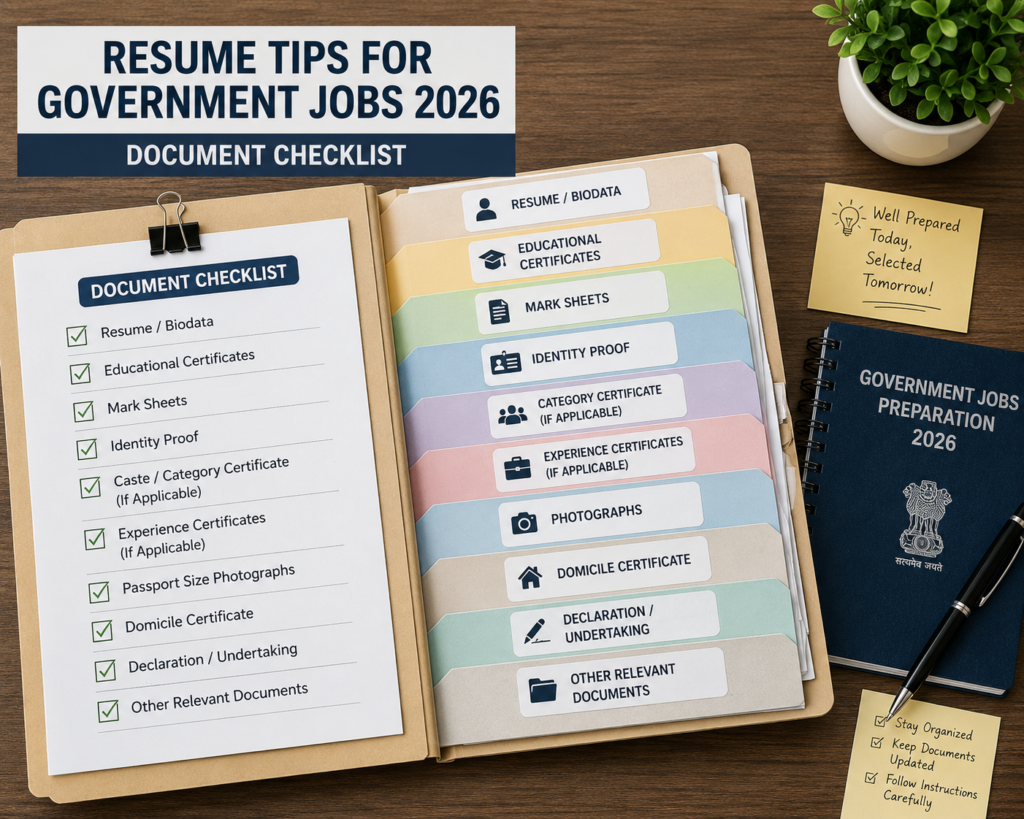
This guide covers what genuinely matters for government and PSU job applications specifically: the correct biodata structure recruitment boards expect, how to handle the physical application forms several notifications still require, document ordering and self-attestation rules, and the small formatting details — capital letters for your name, exact certificate numbers, photograph placement — that cause more rejections than any lack of qualification ever does. If you’ve been applying to DRDO, CSIR, Railways, SSC, or PSU notifications and not hearing back, the issue is very often here.
Table of Contents
Why Government Job Applications Are Different
Private-sector resumes are built to survive an Applicant Tracking System and then impress a hiring manager skimming for 30 seconds. Government and PSU applications work almost the opposite way: there’s often no software filter at all — a real person or a small committee manually checks your submission against a fixed eligibility checklist. That changes what “good” looks like entirely.
A creative resume design, keyword density, or a punchy personal summary carries no weight here and can even work against you if it deviates from a prescribed format the notification explicitly requires. What matters instead is exact compliance: correct field-by-field information, the right document order, proper self-attestation, and precise formatting instructions that vary — sometimes significantly — from one notification to the next.
Resume vs Biodata: What Government Recruiters Actually Want
Most government notifications don’t ask for a “resume” at all — they ask for a biodata, an application form, or both. Understanding the distinction matters:
- Biodata: A structured, factual document listing personal details, educational qualifications, and experience in a fixed order — closer to a form than a narrative resume. Commonly required for walk-in interviews, project staff and research positions (CSIR, DRDO labs), and PSU contractual roles.
- Prescribed Application Form: A specific format provided within the official notification PDF itself, which candidates are required to reproduce or fill exactly as instructed — sometimes even down to typing it on plain A4 paper in a specific layout, as several CSIR and DRDO notifications require.
- Resume: Occasionally accepted for certain PSU management or specialist roles recruited through more corporate-style processes, but even then, usually alongside a separately required application form.
Before preparing anything, the very first step is confirming which of these three the specific notification is actually asking for — submitting a stylized private-sector resume when a strict biodata format was required is a common, avoidable rejection reason.
The Standard Government Biodata Format
While exact fields vary by notification, most government biodata formats follow this general sequence:
- Post applied for and advertisement number — stated clearly at the top
- Personal details — full name (in capital letters, matching your SSC memo exactly), father’s/husband’s name, date of birth, gender, nationality, marital status
- Category — General/OBC/SC/ST/EWS, with certificate details if claiming reservation
- Correspondence and permanent address
- Educational qualifications — in a table format: examination, board/university, year of passing, percentage/CGPA, subjects/specialization
- Experience (if applicable) — organization, designation, duration, nature of work
- Additional qualifications/certifications
- Declaration and signature
Unlike a private-sector resume, there’s no “objective” or “summary” section, no skills cloud, and no attempt at narrative framing — the format is deliberately plain and factual, and departing from it to look more “professional” usually works against you.
When You Need a Typed, Not Handwritten, Application
Several DRDO and CSIR laboratory notifications specify that applications must be typed on a computer and printed on A4-size paper, explicitly stating that handwritten applications will not be accepted. This is a genuinely easy detail to miss if you’re used to filling forms by hand, and it results in outright rejection when overlooked.
If a notification includes a prescribed application form within its PDF, the safest approach is to recreate that exact layout in a word processor, fill in your details digitally, and print the completed version — rather than printing the blank form and completing it by hand. Always re-read the specific instructions for each notification, since this requirement isn’t universal across all government recruitment.
Photograph and Signature Requirements
Government applications are often far stricter about photograph and signature specifications than private-sector portals:
- Passport-size photograph: Usually required to be recent (often within the last 3-6 months), affixed in a specific location on the form (commonly top-right corner), with your signature across the photograph itself in many cases
- Signature on every photocopy: Most notifications require your signature on each self-attested document, not just the main application form
- Live photo capture: Several online recruitment portals (like RRB’s application system) now require capturing your photo live through the portal rather than uploading a saved file — with specific rules on clothing color and background
- File size specifications for online forms: Where digital upload is required, exact file size ranges (for example, 20-50 KB) are often specified — exceeding or falling short of this range can cause an upload rejection
Check every one of these details against the specific notification rather than assuming a standard passport photo suffices everywhere.
Document Order and Self-Attestation Rules
Government applications frequently specify not just which documents to include, but the order in which to arrange them, and how each should be attested:
- Self-attestation: Sign across each photocopy, typically stating “true copy” or simply your signature, on every page
- Gazetted Officer attestation: Some notifications prefer or require attestation by a Gazetted Officer in addition to self-attestation, particularly for category or disability certificates
- Standard document order commonly requested: application form → passport photograph → SSC/10th certificate → intermediate/diploma certificate → degree certificate → category certificate (if applicable) → experience certificates → NOC (if currently employed) → any other specifically requested document
Arranging documents out of the specified order, or omitting the self-attestation signature on even one photocopy, is a routinely cited reason for on-the-spot rejection at document verification stages for walk-in interviews.
How to Write Your Name and Personal Details Correctly
This sounds trivial until it causes a rejection: your name, exactly as it appears on your SSC/10th class memo, is the reference point for every subsequent document and application field. Government forms commonly specify:
- Full name in capital letters, matching your SSC memo precisely — not a shortened or reordered version you might casually use elsewhere
- Consistent spelling across every document you submit — even a minor variation (a missing middle name, a transposed surname order) can trigger a query or rejection during verification
- If you’ve legally changed your name since your SSC certificate, you’ll typically need to declare this explicitly and provide supporting legal documentation
Listing Your Educational Qualifications
Government biodata formats expect educational qualifications listed as a structured table, not prose bullet points:
| Examination | Board/University | Year of Passing | Percentage/CGPA | Subject/Specialization |
|---|---|---|---|---|
| SSC/10th | ||||
| Intermediate/12th or Diploma | ||||
| Graduation | ||||
| Post-Graduation (if applicable) |
Have your certificate/roll numbers ready for each qualification, since several online application systems (including RRB’s portal) require these exact numbers as separate fields, distinct from your general academic details. If your degree marksheet shows a CGPA rather than a direct percentage, check whether the specific notification specifies a conversion formula (commonly multiplying by 9.5) — using the wrong conversion can misstate your eligibility.
Category and Reservation Details
If you’re applying under a reserved category (SC/ST/OBC-NCL/EWS/PwBD/Ex-Servicemen), your biodata or application needs:
- The exact category name as specified in the notification (OBC-NCL specifically, not just “OBC,” where the distinction matters)
- Your certificate’s issue date and issuing authority, since many notifications require the certificate to be in a current, valid format (OBC-NCL certificates in particular often have validity periods)
- Category certificates are almost always required in original, for verification, alongside a self-attested photocopy for submission
Getting this section right matters doubly: it affects both your eligibility assessment and any fee exemption or age relaxation you’re claiming.
Experience Section: What to Include for Government Roles
Where a notification permits or requires work experience (common for Project Associate/Assistant roles at CSIR and DRDO labs, or PSU contractual positions), keep this section factual and specific:
- Organization name, your designation, and exact duration (start and end dates)
- A brief, factual description of your role — avoid marketing language like “spearheaded” or “drove results,” which reads oddly against a factual government format
- Whether the experience is full-time and directly relevant to the notified post — the notification will typically specify what counts (for example, several notifications explicitly exclude apprenticeship, training, or part-time experience from qualifying “relevant experience”)
If you’re currently employed, particularly in a government, PSU, or autonomous body role, you’ll typically need a No Objection Certificate (NOC) from your current employer as a separate document — plan for the time this takes to obtain, since it isn’t something you can arrange same-day.
Should You Include a Cover Letter?
For most standard government notifications with a prescribed application form, a cover letter isn’t expected and isn’t part of the official checklist — including one won’t help and occasionally isn’t even accepted as part of the submission. For roles recruited through a more corporate-style PSU process, or specifically requested in a notification, a brief, factual cover letter focused on your qualification match (rather than a persuasive private-sector pitch) is appropriate. When in doubt, follow the specific notification’s document checklist exactly rather than adding materials it doesn’t ask for.
Preparing a Biodata for Walk-in Interviews
Walk-in interview notifications — increasingly common for CSIR, DRDO, and PSU Project Staff roles — usually specify their own biodata format within the notification itself. A few points specific to this format:
- Bring multiple physical copies of your completed biodata, since some panels request a spare copy for their records
- Keep it factual and current — walk-in biodata formats rarely leave room for a “summary” or “objective” section
- Attach your recent photograph exactly as specified (size, placement, and whether it needs a signature across it)
- Since walk-in registration windows are often strictly timed (many close by mid-morning), have your biodata fully completed and printed before you leave home — don’t plan to fill it out at the venue
Common Mistakes to Avoid
- Submitting a stylized private-sector resume when a prescribed biodata or application form was required. Format compliance matters more than visual polish in government recruitment.
- Handwriting an application when the notification specifies typed submissions. Several DRDO and CSIR notifications explicitly reject handwritten forms.
- Inconsistent name spelling across documents. Your SSC memo is the reference — every subsequent document should match it exactly.
- Forgetting to sign every self-attested photocopy, not just the main application form.
- Submitting documents out of the order specified in the notification’s checklist.
- Using an expired or invalid-format category certificate, particularly OBC-NCL certificates, which often carry validity periods.
- Omitting the NOC when currently employed, especially in a government, PSU, or autonomous body role.
- Assuming a cover letter helps. For most standard government applications, it’s unnecessary and outside the expected checklist — follow the notification’s actual document list instead.
Expert Tips to Strengthen Your Application
- Before preparing anything, identify precisely whether the notification wants a biodata, a prescribed application form, or a resume — this single decision shapes everything else about how you prepare your document.
- Keep a master file of your SSC memo, all certificates, and category documents scanned and organized, so assembling a new application quickly doesn’t mean hunting for documents each time.
- Build a personal checklist template based on the most common document order government notifications request, and adapt it per notification rather than starting from scratch each time.
- If a notification’s application format seems unusual (typed-only, specific file size limits, live photo capture), treat that instruction as the single most important detail to get right — these unusual requirements are exactly where otherwise-qualified applicants get rejected.
- For walk-in interviews specifically, prepare and print your biodata and photocopies at least a day in advance, since strict registration cutoffs leave no room for last-minute printing issues.
- When in doubt about a specific formatting requirement, re-read the official notification PDF directly rather than relying on general resume advice — government application rules vary meaningfully by organization and even by individual advertisement.
Frequently Asked Questions (FAQ)
1. Do government job applications need a resume or a biodata?
Most require a structured biodata or a prescribed application form specified within the notification itself, rather than a private-sector style resume — always check the specific notification’s requirements first.
2. Can I use my regular private-sector resume for a government job application? Generally no, unless the specific notification explicitly accepts a resume format. Most government and PSU recruitment expects a fixed biodata structure or a prescribed application form instead.
3. Why do some DRDO and CSIR notifications require typed applications?
Several labs explicitly state that handwritten applications will not be accepted, requiring candidates to type and print their application form on A4 paper in the prescribed format instead.
4. How should I write my name on a government application?
In capital letters, exactly matching how it appears on your SSC/10th class memo — consistency across every submitted document is important for verification.
5. Do I need to sign every photocopy I submit?
Yes, in most government applications. Self-attestation typically requires your signature on every photocopy, not just the main application form.
6. Is a cover letter necessary for government job applications?
Usually not. Most government notifications specify an exact document checklist that doesn’t include a cover letter — follow that checklist rather than adding extra materials.
7. What documents are typically required alongside a government application form? Commonly: a recent photograph, self-attested copies of your SSC/10th, intermediate/diploma, and degree certificates, category certificate if applicable, experience certificates, and a No Objection Certificate if currently employed.
8. What is a No Objection Certificate (NOC), and when is it needed?
An NOC is a letter from your current employer confirming they have no objection to you applying for another position — required for candidates currently employed in government, PSU, or autonomous body roles.
9. Do I need a Gazetted Officer’s attestation, or is self-attestation enough?
This varies by notification — some accept self-attestation alone, while others prefer or require Gazetted Officer attestation, particularly for category or disability certificates. Check the specific notification’s requirements.
10. What’s the biggest resume-related reason government applications get rejected? Format non-compliance — submitting a private-sector-style resume, a handwritten form where typing was required, or an inconsistent name across documents — rather than a lack of actual qualification.
Conclusion
Resume Tips for Government Jobs 2026 come down to a fundamentally different discipline than private-sector resume advice: exact compliance with a prescribed format matters more than creative presentation. Confirm whether your target notification wants a biodata, a typed application form, or a resume; match your name and details precisely to your SSC memo; get your document order and self-attestation right; and treat any unusual formatting instruction — typed-only submissions, live photo capture, specific file sizes — as the detail most likely to determine whether your application is even considered.
For more application guidance and verified recruitment updates, check out our Resume Tips category page for regularly updated, practical advice. And if you’re preparing documents for a specific upcoming opportunity, our guide on CSIR NAL Walk-in Interview 2026 covers the exact document checklist required for that live recruitment.
Suggested Internal Links
- Resume Tips Category
- Resume Tips 2026: Land Your Dream Job Faster
- CSIR NAL Walk-in Interview 2026: Best 89-Post Guide
- RRB JE 2026 Application Process: Best Step-by-Step Guide
Suggested External References (for fact-checking and updates)
- Department of Personnel and Training (DoPT) — Government of India: https://dopt.gov.in
- National Career Service Portal (India): https://www.ncs.gov.in
- UPSC official guidelines on application and biodata format: https://upsc.gov.in