Verify Company MCA Portal Say the offer letter arrives from “Acme Technologies Pvt Ltd” (an invented name, used here so no real company is implicated). The letterhead looks fine, the salary is decent, and the recruiter is friendly. Before you reply, you can spend ten minutes on something most people skip: looking the company up in the government’s own registry.
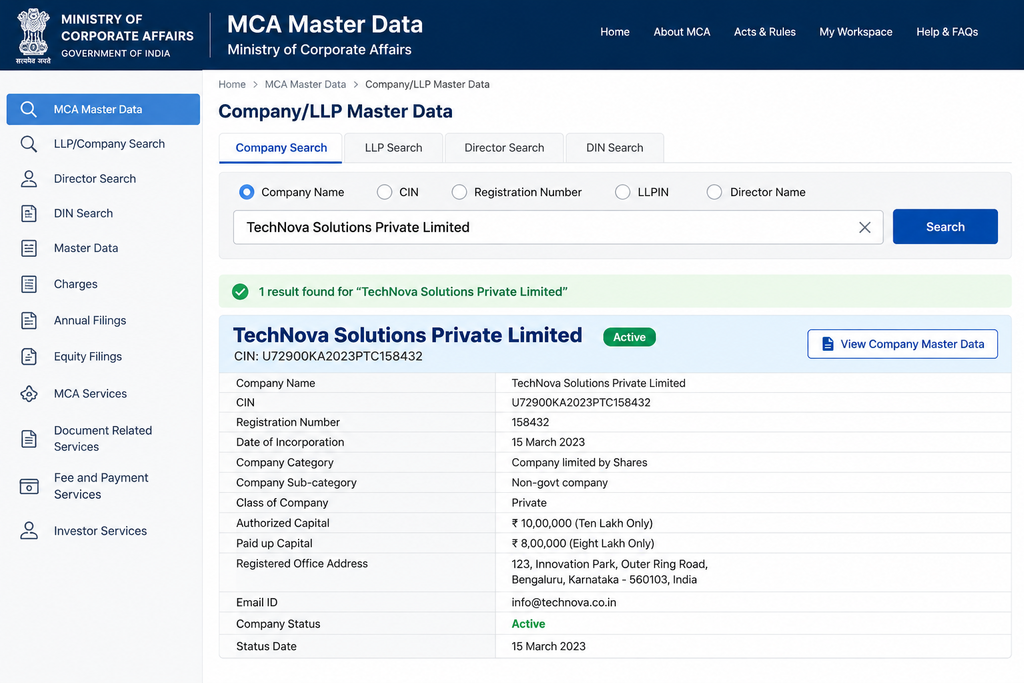
The Ministry of Corporate Affairs (MCA) maintains a public database of registered companies and LLPs in India. Its “master data” lookup is free for basic details, and it takes far less time than most people expect.
Step 1: Open the lookup
Go to the MCA website (mca.gov.in) and open MCA Services, then View Company/LLP Master Data.Verify Company MCA Portal That is the path described by several company-filing sites for the current MCA V3 portal. The MCA’s own help page, which I could see only as a search snippet because the site blocked my automated request, describes an older version of the same flow: enter the company name or its CIN, and if you don’t have the CIN, type the first few characters of the name and press Search. Menu labels can change between portal versions, so if yours looks different, look for “Master Data.”
You’ll usually be asked to solve a captcha before results load.
Step 2: Search by name, then match the right entity
Type the name exactly as it appears on your offer letter. If several companies come up, don’t pick the first one. Filing-service sites recommend narrowing by state of registration and incorporation date, and this matters more than it sounds. Similar-sounding names are common, and “Acme Technologies Pvt Ltd” and “Acme Technologies Global Pvt Ltd” can be entirely unrelated companies.
If nothing appears, check spelling and try a shorter part of the name before concluding anything. Not every business is on this registry at all. Sole proprietorships and ordinary partnerships aren’t registered with the MCA, so a small firm being absent is not automatic proof of fraud. But a company that calls itself “Pvt Ltd” or “Limited” and can’t be found deserves hard questions.
Step 3: Read what comes back
According to the filing-service sites I checked, basic master data typically shows the company name, its CIN, status, date of incorporation, registered address, directors, and capital. Here is what to compare against your offer:
| What the registry shows | What to compare it with | What a mismatch might mean |
|---|---|---|
| Legal name | Name on offer letter and contract | You may be dealing with a different entity, or a brand name rather than the employer |
| Status | Whether they’re actively hiring | “Active” is what you want to see. Struck-off or dormant entries are serious red flags for a company recruiting staff |
| Date of incorporation | Any “established since” claim on their website or letter | A firm claiming 15 years of operation that was incorporated last year needs an explanation (there can be innocent ones, such as a restructure) |
| Registered address | Address on letterhead | A different address can be a legitimate branch office, so treat it as a question to ask, not proof of fraud |
| Directors | The company’s own website or public profiles | Not decisive on its own, but a company with no visible leadership anywhere else online is worth noticing |
What the CIN tells you
The CIN (Corporate Identification Number) is a 21-character code. From my general knowledge of the format, not from the sources above, it encodes a few facts you can sanity-check against what the company tells you. Here is an invented, illustrative example:
U72200TG2015PTC000000
- U means unlisted (a listed company starts with L)
- 72200 is a five-digit industry code
- TG is the state of registration
- 2015 is the year of incorporation
- PTC means private limited company (PLC is used for public companies, and other codes exist)
- 000000 is a registration number (zeros here because the example is made up)
If a company says it is a listed public company but its CIN starts with U, or the year in the CIN doesn’t match the “founded” year on their website, ask about it. Please confirm the current format on the MCA portal itself rather than relying on my summary.
Step 4: Foreign and unusual cases
Foreign companies operating a branch or liaison office in India are reported to appear under a Foreign Company Registration Number (FCRN) rather than a CIN, according to one filing site. If a “multinational” is recruiting you in India, an FCRN entry or a registered Indian subsidiary is what you’d expect to find.
What this check cannot tell you
This is the most important part of the guide, and it’s easy to skip. A registration check proves a company exists. It does not prove the person emailing you works there, or that the job is real.
Scammers don’t need to invent a company. They can borrow the name of a real, registered, respectable one and send offers that look legitimate. In that case, your MCA lookup will come back perfectly clean, because the company genuinely exists, and you’ll be reassured for exactly the wrong reason.
So use the MCA check alongside the other checks, not instead of them:
- Does the recruiter’s email come from the company’s actual domain, or from a free email address?
- Does the job appear on the company’s own careers page?
- Have you found a phone number for the company independently, not from the offer letter itself?
- Is anyone asking you for money at any stage? A real employer doesn’t charge candidates for hiring, training kits, or “security deposits”, however legitimate the paperwork looks.
Also keep in mind that basic master data is exactly that, basic. Detailed filings and financial statements may need paid or authorised access, as several of the sources note. And GST registration is held in the GST system, not in MCA master data, so this lookup won’t confirm a company’s tax status.
If you’ve already sent money or documents to someone you now doubt, India’s National Cyber Crime Reporting Portal (cybercrime.gov.in) and the 1930 helpline are the official channels. Acting quickly matters.
A realistic way to use this
Treat the lookup as a filter that catches the lazier frauds, such as a made-up company name, a struck-off entity, or a “Limited” that isn’t on the register. It won’t catch everything. If the company passes, you’ve cleared one hurdle, not all of them. If it fails, you’ve saved yourself a lot of trouble.
Suggested Internal Links
- Job Offer Scams 2026: What a Real Offer Actually Looks Like
- Background Verification India 2026: What Actually Gets Checked
Suggested External References
- Ministry of Corporate Affairs: https://www.mca.gov.in
- National Cyber Crime Reporting Portal: https://cybercrime.gov.in